

Quick Summary
This KORONA POS review covers a flexible, inventory-first system built for specialty retail. It fits liquor, convenience, and ticketing well. You choose your own payment processor instead of being locked to one, which trades some simplicity for flexibility. Service stays remote, and grocery compliance tools run thin.
Here are the pros and cons at a glance.
Pros | Cons |
|---|---|
Deep, retail-grade inventory tools | German-rooted terms feel unfamiliar |
Bring your own payment processor | The interface looks dated to many users |
No long-term contracts | Per-terminal pricing adds up fast |
Strong US-based phone support | Thin native age verification |
Scales cleanly across locations | Remote-only help, no local visits |
Overview of KORONA POS
KORONA POS is a cloud-based system built by COMBASE.
The software started in Germany and now serves US retailers. You pay a flat monthly fee per terminal and pick your own payment processor separately. That split is the core idea behind KORONA’s pricing.
KORONA leans toward specialty retail rather than big-format stores. It targets liquor shops, convenience stores, vape and smoke shops, wineries, gift shops, and ticketed venues. Each store type gets a tuned feature set on top of the same core platform.
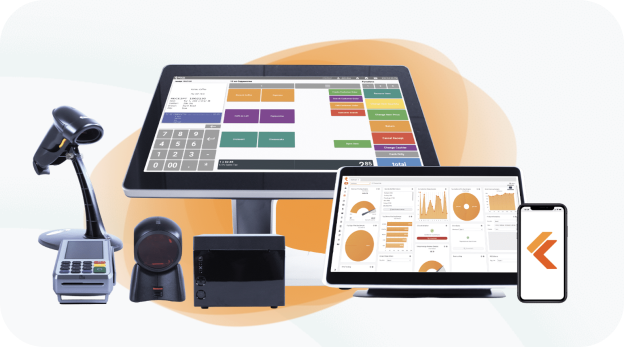
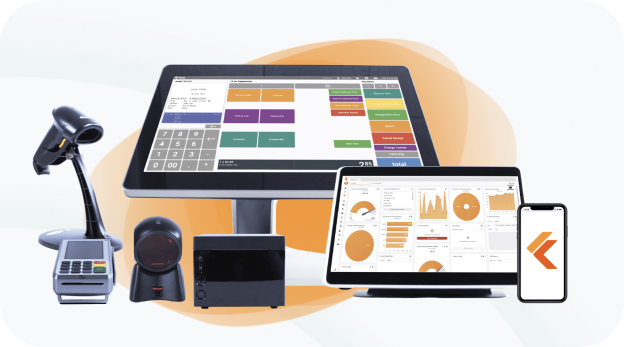
The system runs on Windows and Linux. It supports stationary terminals, mobile setups, and self-checkout kiosks, making it a flexible and capable option for many businesses.
Key Features
KORONA covers the daily needs of an inventory-heavy store. Here’s what stands out.
Hardware Options
KORONA does not force you onto locked, proprietary terminals. Instead, you build a setup that fits your needs with:
- Stationary terminals for fixed checkout lanes
- Mobile and tablet setups for line-busting or events
- Self-checkout kiosks for high-traffic counters
- Standard peripherals like scanners, printers, and drawers
Because the software runs on common operating systems, you have more hardware to choose from.
Payments and Checkout
- KORONA is processor-agnostic, so you choose who handles your card payments
- You can shop rates, negotiate, or switch processors without replacing your POS
- Checkout supports swipe, chip, tap, and mobile wallets
This freedom matters most as your card volume grows.
Here’s how we think about POS payments for independent retail.
Inventory and Reporting
- KORONA tracks stock in real time across every location
- Reorder points, vendor management, and automated ordering come built in
- ABC analysis flags your top sellers and your dead weight
For data-driven owners, the reporting earns its keep.
Employee and Customer Tools
- KORONA handles staff logins, permissions, and time tracking
- Loyalty programs and gift cards run inside the core system
- CRM features let you build customer profiles and target promotions
You get these tools without stacking on a pile of third-party apps.
Integrations and Add-On Modules
- KORONA connects to accounting, payroll, scheduling, and eCommerce tools
- An open API lets partners build custom links
- Optional modules add restaurant service, invoicing, ticketing, and franchise control
Pricing
KORONA‘s pricing comes in two parts: a flat monthly software fee per terminal, and the separate processing you arrange yourself.
Plans are month-to-month with no forced contract. Treat the figures below as 2026 list prices, not a quote for your store.
Software Plans
KORONA sells three retail tiers, each billed per terminal:
- Core: $59 per terminal per month
- Retail: $79 per terminal per month
- Plus: $99 per terminal per month
Core handles checkout, reporting, gift cards, and eCommerce. Retail adds full inventory and supplier tools. Plus layers on advanced stock control and deeper analytics.
Add-On Modules
Specialty needs sit in separate packages:
- KORONA Food: +$10 per terminal per month
- KORONA Invoicing: +$10 per terminal per month
- KORONA Ticketing: +$50 per gate per month
- KORONA Franchise: +$30 per franchise per month
- KORONA Integration: +$45 per token per month
Pick only the modules your store actually uses.
Hardware Costs
Hardware is a separate, upfront line item. A full register setup costs between $800 and $3,500, depending on parts.
You can buy new, used, or reuse compatible gear you already own to cut down on costs.
Processing Fees
Here’s where KORONA differs from bundled systems. KORONA does not lock your processing.
You choose your processor and negotiate your own rate. Higher-volume stores can drive that rate down. You can also set up cash discounting to pass fees to customers.
Watch the Hidden Costs
A few line items can surprise growing teams.
- Per-terminal pricing multiplies as you add lanes
- Specialty modules stack on top of the base plan
- Hardware costs ride separately from software
- A learning curve can stretch your setup timeline
The headline plan price is rarely your full bill. Add up terminals, modules, and hardware before you decide.
A Real-World Cost Picture
Say you run a two-lane liquor store. You pick the Retail plan for both terminals.
Software runs $158 per month for the pair. Add hardware up front, then your own negotiated processing on every sale. The processing rate, not the software, usually decides your monthly total.
Pros
KORONA does several things well. These are its real strengths.
- Inventory depth: reorder points, vendor tools, and ABC analysis built in
- Processor freedom: shop, negotiate, or switch card rates anytime
- No contracts: month-to-month billing with annual discounts available
- Strong support reputation: US-based help by phone, chat, and email
- Multi-store control: compare locations in real time from one back office
- Customizable checkout: rearrange buttons, layouts, and prompts to fit your flow
If you want control and data, KORONA gives you a lot for the price.
Cons
KORONA suits some owners more than others. Here’s where it can frustrate.
- German-rooted terms: the interface uses labels that take time to learn
- Dated look: several users say the UI feels built by developers, not designers
- Per-terminal math: every added lane raises your monthly bill
- Thin age verification: reviewers say the ID check shows little and stores nothing
- Smaller integration list: fewer plug-ins than the big app marketplaces
- Remote-only help: no local partner shows up when a lane goes down
None of these sinks the system, but for age-restricted, service-sensitive stores, they do add up.
Who Should Choose KORONA POS
KORONA fits some businesses well. You’re likely a good match if this sounds like you.
- You run a specialty retail store with deep inventory needs
- You want to pick and negotiate your own payment processor
- You manage multiple locations and want real-time visibility
- You value detailed reporting and stock analysis
- You prefer month-to-month billing over locked contracts
- You’re comfortable learning a feature-rich system yourself
If most of these match, KORONA is a capable, flexible choice.
Who Shouldn’t Choose KORONA POS
KORONA is built for self-driven specialty owners. Think twice if this is you.
- You run an independent grocery store needing WIC, EBT, and benefits compliance
- You want strong native age verification for liquor or convenience sales
- You’d rather have guided setup and training than learn software solo
- You run many lanes and feel the per-terminal cost stacking up
- You want a local partner who knows your store and shows up in person
- You prefer one team for hardware, software, installation, and service
For these operators, the gaps matter day to day. The software might be strong, but the model may not fit how you run.
What to Choose Instead
If KORONA isn’t the right fit, here’s what to look for in an alternative.
Compliance Built for Your Vertical
Grocery and convenience stores live on benefits and age rules. WIC, EBT, and reliable ID checks should work out of the box.
A weak age check is a daily risk, not a small flaw. Our convenience store POS treats verification and scan data as core features. Compliance belongs in the system you use every shift.
Inventory That Matches Real Buying
Liquor stores break cases into bottles. Grocers buy on deal cycles and manage margin in tight windows.
Look for native case cost, bottle cost, and vendor program tracking. That’s how grocery inventory tools should behave. Many independent grocers manage gross margin through deal-buying, not perpetual counts, and the right system should respect that.
Guided Setup, Not a Solo Climb
A learning curve costs you time and patience. New owners often want a system that someone can teach them.
The better path pairs strong software with real onboarding. That matters most during a multi-location rollout, where small mistakes multiply across stores.
Built for Generational Handoffs
Many independent grocers are passing their business to the next generation. The incoming owner usually wants a modern system, not the setup they inherited.
A well-supported POS makes that handoff smoother. It signals that the store is ready to grow, not just hold steady.
Add-Ons That Fit Your Store
The right system makes upgrades simple, not stressful. Look at our self-checkout, loyalty programs, and electronic shelf labels to see the idea.
These should slot in cleanly, without fighting your POS or piling on cost.
Local Service That Shows Up
When a lane fails on a Saturday, a phone queue is not enough. A local partner who knows your store can get you running again.
That’s the line between a vendor and an advisor. One sells you a box. The other helps you run the business.
The BMC Perspective
Here’s our honest disclosure. BMC has served independent retailers since 1958.
We’ll give KORONA real credit. The processor freedom is a genuine advantage, and the inventory tools are strong for the price. For a self-driven specialty owner, it’s a fair pick.
Our bias is also clear. We build for grocery, c-store, liquor, and thrift workflows, prioritizing compliance and age verification from the start. We believe local, hands-on service and real training beat a support queue, especially during a switch.
Pick the system built for how your store actually runs. Request a demo today.
FAQ
Is KORONA POS good for liquor stores?
For the most part, yes. The inventory and reporting software is strong, and the processor freedom helps margins. Reviewers do flag the age-verification tool as weak, which matters for compliance-focused owners.
How much does KORONA POS cost per month?
Software runs $59 to $99 per terminal per month. Add-on modules and hardware cost extra. Processing is separate, since you arrange your own processor and rate.
Can you choose your own payment processor with KORONA?
Yes. KORONA is processor-agnostic. You select and negotiate your own processing, then switch later if a better rate appears, without replacing the POS.
Does KORONA POS require a contract?
No. KORONA bills month-to-month with no forced contract. Discounted annual plans are available, and you can cancel without surcharges.